Originally written .
And it didn't go too well.
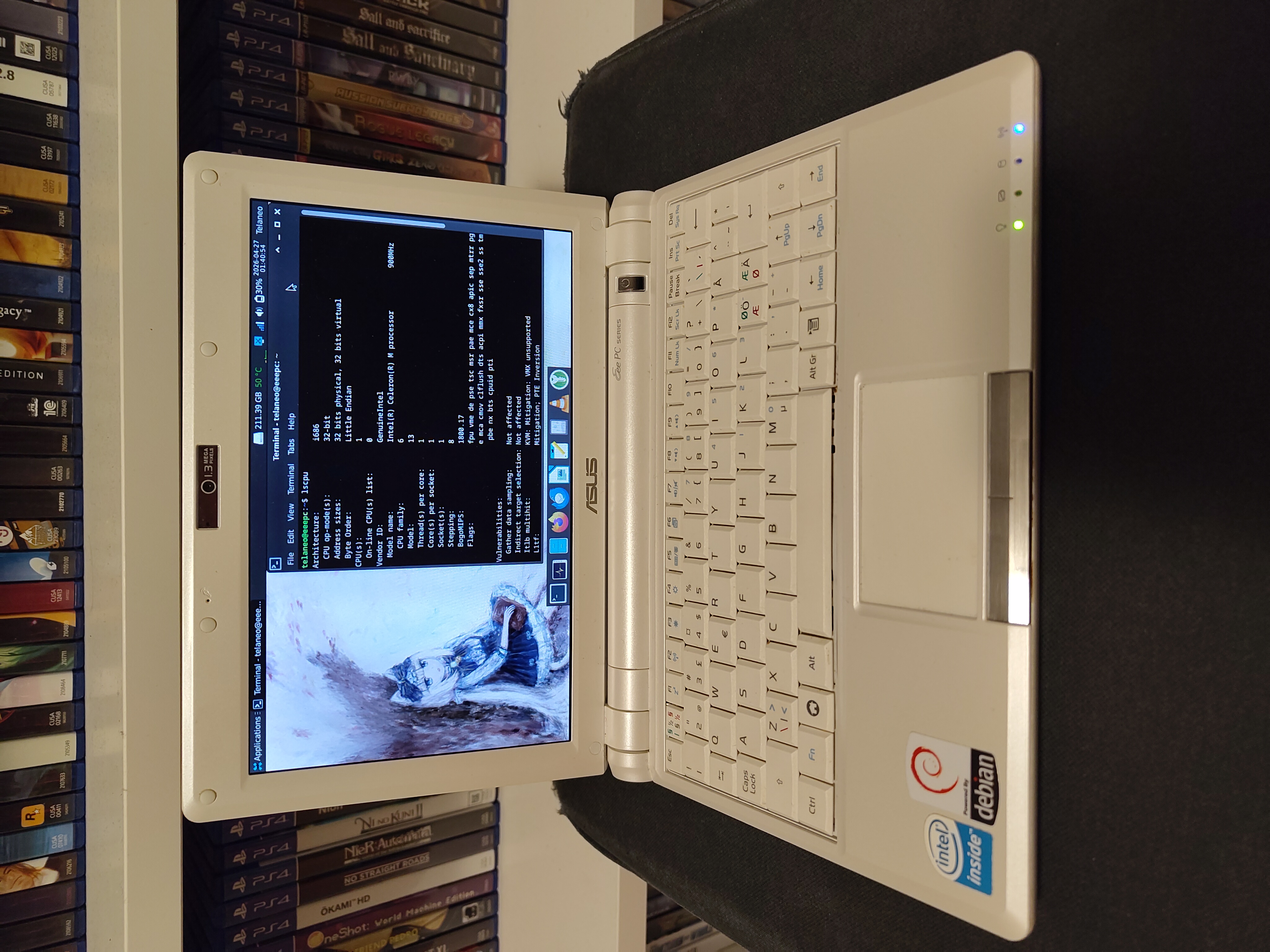
For those who don't know, the Asus Eee PC is a netbook which was introduced in 2007. I got mine in 2008, and although I don't have the one I got back then any more, I bought a new used one to dick about with. I was mostly just curious how well it would hold up these days, and thought that if I could find one at a nice price that was a good specimen, it would make for an interesting journey. And I did find a good specimen. But that doesn't mean that I'd want to use it for much.
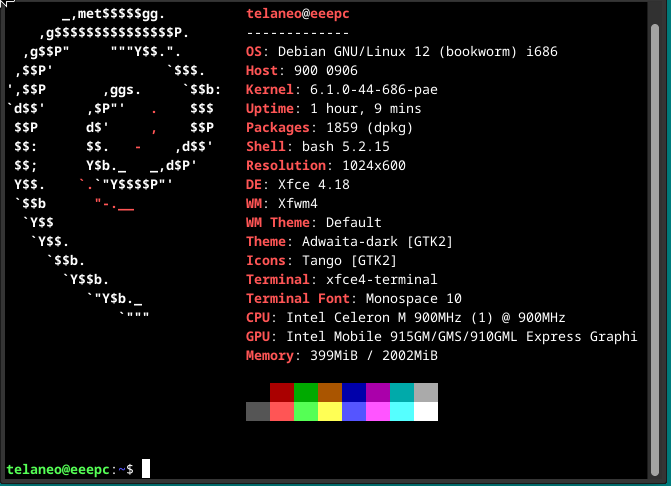
My machine is an Eee PC 900, so it's a newer revision compared to the original Eee PC 700, but that doesn't really help it much. The CPU is an Intel Celeron M running at 900 MHz. From what I can tell it seems to be an Celeron M ULV 353, but the chip doesn't seem to reveal that much about itself, but the specs given for that model number most closely matches what's actually in my machine. It's a single-core 5 W chip running at less than 1 GHz, probably released in 2004. It was never going to win any awards for performance, let's put it that way. And usage reflects that. Any actual usage will instantly peg the CPU at max utilisation. Bottlenecks in other areas basically don't happen. It isn't even 64-bit. It's a 32-bit processor. One advantage though is that it never gets hot enough to overheat. I think I've only barely seen it crack 70 degrees.
My machine came with 1 GB of RAM, although I did eventually upgrade it to 2 (after having bought way too many sticks, since several I got had errors or were just dead). Not that that did much. From what I could tell just perusing through the system monitor, RAM usage never climbed significantly over 700 MB, although it did hit the swapfile here and there. The extra GB doesn't do much beyond than giving the OS more room to breathe. Not that that actually matters all that much.
Believe it or not, this machine actually shipped with an SSD. There isn't really space in a machine this small for an actual hard drive, so SSD it had to be, but SSDs weren't where they are now. Mine came with a 16 GB SSD, but there was also a 20 GB option. For the original custom Linux install, I guess that would have been fine, since an old Linux based OS doesn't take up that much space, and any files the user was likely to put on the machine (documents and the like, not many pictures, definitely not much in the way of video) wouldn't take up much space either. The original Windows XP install though, that would probably have been a much more cramped experience. Sure, XP fit fine on a CD, but by 2008, SP2 was out and SP3 was imminent, and since the user would have had access to 'normal Windows', they would have been able to install any number of programs they wanted. The machine doesn't have a disc drive, so no software off disc without a bulky external drive, but the web is full of software, both that you might want and that you probably don't want, but users got anyway. I'd imagine those SSDs filled up fast, and ran basically full most of their life. Mine shows some bad sectors using badblocks, which is what prompted me to replace it. It unfortunately doesn't seem to expose any S.M.A.R.T. data, which is a first for me (barring USB drives, SD cards and the like).
The original SSD is, annoyingly, not a standard form factor. It's on a PCI Express Mini Card, which nothing seems to use for SSDs expect the Eee PCs. Thankfully, the Chinese are here to help. You can Just™ buy adapters from that to MSATA, and while that isn't the most common standard for SSDs, it is at least a standard, and one you can Just™ buy. They're more expensive than equivalent drives in more common sizes, but it'll do. You might need to update the BIOS on your machine to get one of those to work, but that's doable. See BIOS upgrade instruction for Asus Eee PC. After having used the 16 GB SSD for a little while, and not even getting close to running out of space, I decided to buy the smallest capacity MSATA SSD I could reasonably get from a local place. Which of course ended up being a 256 GB Kingston KC600. Massive overkill. But hey, I guess I have an MSATA SSD now? Annoyingly it doesn't have a DRAM cache, which all SSDs should have, given the performance penalty of not having one. But since MSATA SSDs are such a niche market, I didn't have much choice. I did find the Transcend 370S, which seems to have a DRAM cache, although its pricing is absurd compared to its capacity, at least at the places I could buy one. Not that that would have mattered all that much on a machine like this, and presumably on the machines it's intended for (that is, probably some bespoke industrial machine which just happened to pick MSATA because it was designed in 2010 or whatever). Whatever you buy these days for a machine like this though, it really doesn't matter, since the SSD isn't ever really going to be the bottleneck.
The battery in mine still works, but it's probably not something you'd want to rely on, especially given that the machine is slow to the point of you not being able to roughly estimate how quickly something that should be really quick will take. If you Just™ need to quickly check some website, that's going to take a long time if you need to go through several login-pages and the like to actually get there. I did run a battery test though. The machine runs with the CPU pegged at all times, so I figured there wasn't any point in running a full stress test and a regular usage test, since for the purposes of this machine, those two cases are functionally the same. I charged the machine up to an indicated 100%, started a stress test using s-tui, pulled the plug and started my stopwatch. The machine shut down after 2 hours and 18 minutes, which was quite a lot better than I expected. I'm not sure what the battery life was when it was new, but it's not going to be 4+ hours, since that basically wasn't a thing on laptops back then. So the battery must have held up quite well. That said, I'm not sure there's much you can do with this. You can't watch a DVD on this thing without also bringing an external drive, since there's no internal drive, so that's mostly a bust, while trying anything else you'd want to do, you'd be very annoyed for not being able to do more of. If I'm on a 5 hour train ride, the 2-ish hour battery life isn't going to keep me distracted for all that long, while my phone would, especially if I bring a battery bank. So the battery is just there as a UPS. Nice to have, but not something you ll be relying on. In theory you could open the battery and replace the cells, since they're clearly just 18650s inside, but that's a job that's complicated enough that iFixit isn't going to have any guide for anyone to follow. I'd be curious to know how long the machine could run on modern batteries though, since the difference between a 2008 cell and a 2026 cell is going to be quite large, and will probably even make up for the fact that the machine runs at full bore for every little thing, while that wouldn't have been the case as much back in the day.
The charger is, all things considered, quite nice. It's a relatively normal barrel jack connected up to an external power brick, which is always annoying, especially considering I can't unplug the cable from the barrel connector side from the power brick, so it's just always going to be annoying to coil up. The barrel jack though, is actually quite nice. I mostly just hate barrel connectors on random electronics and PCs, since they always feel like shit and often don't really mate positively. This one does however. I wish I could swap it for a USB-C plug, just so I don't need to keep this exact charger with it and could swap it out for any other random one, and while that's certainly possible in this day and age, it's a rather extensive mod I'm not prepared to bother to do. This machine is only for dicking about with, and not for actual usage, so the charger doesn't bother me that much, especially when the connector is nicer than it had to be.
You can of course buy a USB-C to barrel connector cable, and use whatever barrel adapter so you can charge over USB-C. It's not as convenient as actually having a USB-C port on the machine itself, but it does work. Or at least it should. My machine started making a whining sound when I charged it that way, and the battery indicated went way down after unplugging the cable, as if the charger was somehow discharging it. I'd rather not invite problems, so I just stuck to using the normal charger. I'll manage, especially when it manages to be better than the average barrel connector.
The IO is also surprisingly nice given the machine's diminutive size. There's a whopping 3 USB ports on it. For a machine this small, considering where we're at today, that's quite the boon. None of them are USB 3, but given the machine barely has any storage, I don't think you'd ever actually need that speed. For the sneakernet-type tasks you'd do back then, USB 2 is perfectly fine. I'm not sure what you'd need three of them for on a machine like this. One for a mouse is understandable. A second one for a USB stick also makes sense. A third one for a keyboard, maybe? Or a second USB stick because you don't want to stage whatever file transfer you're doing on the machine itself? Either way, not complaining. There's a headphone jack and a microphone jack, which do their job as expected. The ethernet is as expected, only maxing out at 100 Mbit, but for this machine, that's understandable. It was never going to need gigabit speeds. The SD card slot is quite nice, and honestly, it's probably the most reasonable way to expand the machine these days. Put all your media on an SD card and just slot that in. Any decently sized SD card is going to be bigger than the original SSD, and you can even get SD cards of comparable sizes to what you'd even replace the original SSD with. Even just a 64 GB SD card will fit a lot of music, especially if they're not all FLACs, and with that, the machine can be used as a decent music player.
It even has video out thanks to a VGA port. That said, I'm sceptical of how useful it would be these days. I get why they picked it back then. VGA was universal back in 2008, even TVs were getting it, but it's been going away ever since. If it were HDMI, then I would be able to connect it to basically any TV and any monitor out there I'm likely to want to connect to. VGA limits me to monitors, and only monitors of some vintage. I'm also not sure what you'd be showing off over it. I guess you could do your office presentation on it, but that's about it. Video was barely ever possible, so blowing it up to a larger screen doesn't really give you anything. On some level, I wish it were composite instead, since any older-ish TV will do that, and it puts the output squarely into the 'I'm not here for quality, I'm here to show off something quickly and easily' camp. If I could get the VGA output to do 480i or 240p I guess I could make that happen myself with a transcoder. Maybe an adventure for another time.
The VGA output itself is good. I guess this was past the era of bad quality VGA outputs being a thing. It does 1080p just fine for what it's worth, but trying to extend the display causes garbled graphics. Mirroring works well enough for what you'd use this for, although xfce doesn't handle it as gracefully as one could expect. Maybe it's a driver thing, or just the chip simply not having that feature (I don't think dual-head was universal yet by this time?).

I'm surprised at the included webcam, but at the same time, not really. It's a 1.3 megapixel camera, which is exposed as 1280x1024. A lot higher than I expected, but it only runs at like, 2 FPS, so not great. This feels unreasonably bad no matter the time period, as 2 FPS is less video and more slideshow, but it could just be the software at fault. I have a vague memory of the original Linux OS that came on these machines having Skype on them, so I guess video calls are what you'd use this for. I guess encoding a 320x240 video stream or whatever while also decoding an equivalent stream from whomever you're talking to is a viable ask, although I guess this would never have been a good experience. I suspect an awful lot of Skype video calls on machines like this would have practically run at 5 FPS or less, especially when you consider the wi-fi and internet connections of the day. Sadly, I don't think I'll be getting this camera on Discord or any other video call for that matter to actually test that. Even before you get to the video stream, the app itself is going to chug. The camera itself isn't that bad in my opinion, at least going by the output I can get from Cheese. It has pretty muted colours, as was typical of cheap cameras at that time, and the field of view is pretty narrow, but it's far from difficult to make out your subject. It's perfectly cromulent as a webcam (although maybe not today, if only because our standards are a lot higher than they were even in, say, 2015), but unless you want to make goofy faces in front of your computer, this feature is fairly useless today. It would have been enough for grandma to see you on a video call in 2010, but I can't imagine wanting to use it for anything else.
Speaking of wi-fi, it does have it. Wi-fi is basically what made the netbook viable, so no surprises there. It's 802.11g, so 2.4 GHz only, but that's not really a surprise. It's not a problem for me at home, since I've got other old stuff that needs old wi-fi, so I keep a 2.4 GHz network around just for them (even though I'd really prefer them to use ethernet). If you were to actually use it out in the wild, hopping between wi-fi hotspots, as one did, I'd imagine you'd run into a lot of 5 GHz-only networks, or places where, although there is a a 2.4 GHz option, it's crowded to death, or uses newer security that this chipset doesn't support. Or maybe that's a problem on the software side of things? If that's the case, then the new-ish Linux I've got at least takes care of that problem. Either way, I found the wi-fi to be pretty decent. It's not as quick as hooking it up over ethernet, but it connected to my network without issue, it was stable, and I didn't really think about it after I connected it. That's honestly fairly impressive on it's own. It got out of the way and Just™ Worked™.
The keyboard is tiny, and I do mean tiny. It is functional, but I wouldn't want to do any long-form writing on it. It's fine for the small amount of typing you would do on a machine like this: short emails, typing 'google.com', heck, even for the few games I've played it's been all right. But the layout is really cramped, and I thus spend a long time typing up anything decently long. The biggest problem for me has been that the number row is pushed all the way to the left, so every time I want to press the 1-key, I hit the 2-key, since my finger naturally reaches for the edge of the keyboard, to find what would normally be the |-key, and then go one key to the right to find the 1-key. That doesn't work here. Also, the |-key has been pushed up one row in between the Escape-key and the F1-key, which I guess makes some sense if you want to preserve that key. The Tabulator-key is really small due to the space constrains. Outside of those two obvious and tangible issues, the problem is mostly just that it's really small and thus cramped. Tiny keys make for slow typing. I'd be curious to see how a child would manage on this. The layout is mostly standard, so it might not be bad for someone to learn how to touch-type, and then grow into a full-size keyboard with full-size keys.
The touchpad is, all things considered, not that bad. Don't get me wrong, it's tiny and its sensitivity is right in line with 2008. But it's good enough that I never got annoyed at it doing the stuff you're intended to do with it. So long as you only use it for clicking around the normal UI, it never really gets in the way. Heck, even two-finger swipe works, although there's not a lot of space to scroll with to begin with. It collapses the instant you want to play a game on it though, but even modern touchpads do that, barring maybe turn-based games. I suspect if I were actually stuck with this touchpad over an extended period, I'd eventually put some time into just learning every damn keyboard shortcut I could, but for short intermittent use, it's all right. The left mouse button on mine is a bit worn, which was annoying when I first discovered it, but it too isn't that big of a problem, at least when you know about it.
The screen is small, at 9 inches, but the physical size honestly isn't its biggest problem. The biggest problem is that it's 1024x600, which honestly does not give you enough desktop space. You can keep one fullscreen app open at a time, so one Firefox window, or one Thunderbird window, or, in a pinch, two terminal windows or two file browsers, but anything more quickly becomes a hassle. Even Keepass is relegated to being a fullscreen app. It doesn't allow itself to be scaled small enough to practically have it open at the same time as Firefox to copy over a password. This is less of a problem than it could be, simply because the machine is so weak. Since you're stuck with a shit CPU, you don't actually want to do any multitasking of note, but it's still annoying when you want to copy a piece of text from one program to another. Honestly, this might be a good machine to use multiple virtual desktops on, and xfce does have feature. But at that point you're probably asking a bit too much from a machine like this. Sure, it can do it, but would you want to? Outside of the resolution though, it's all right. The brightness is fine, especially for the time. The viewing angles aren't great, but they're fine. I didn't really feel like I was missing out on anything outside of more desktop space, for which I need more resolution.
The speakers aren't terribly loud, but they're competent. You wouldn't want to use them anywhere there's much noise, but you shouldn't be using speakers out in public anyway. At home, while you're sitting in front of it, they're clear, they don't distort, and they're functional. Even just having music on in the background is enjoyable, and I wouldn't blame you for using them for that, although you'd want to connect the machine up to some external speakers if you intend to listen to it from more than a couple of steps away.
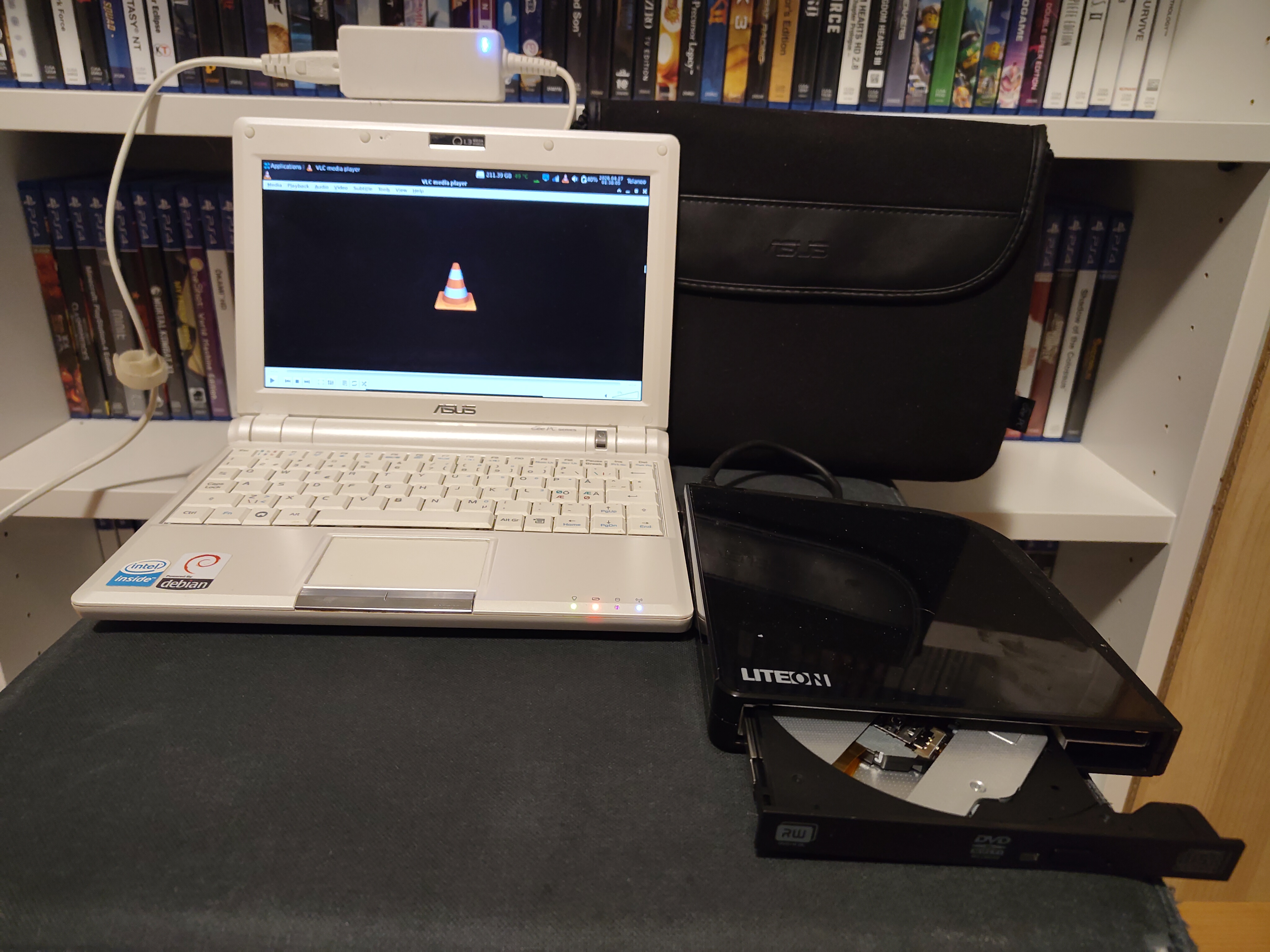
The machine doesn't have a disc drive, which isn't unreasonable given the size. I'm not sure if netbooks ever had them, but I think I've seen machines just slightly larger have them. Either way, not having a disc drive in 2008-2009 would have been really annoying, especially given the small SSD, meaning installing large programs on the machine itself isn't really viable (mostly relevant for games). Not being able to play DVDs would also suck back in 2009. Not to mention that the machine came with a recovery CD, so if you wanted to restore the machine, you would need an external drive. Thankfully, they've never been terribly expensive, and even ones with USB were common back then. I still have one now just in case I need to read a disc on a modern laptop, and I thought it'd be prudent to at least confirm the experience is fine. Mine's a slimdrive that can also be run purely of USB, which I'm fairly certain also existed back in the day. With the battery life of the machine though, I doubt you'd be able to get though much more than one film, and that film better not be The Lord of the Rings or something else that's around the 3 hour mark. The setup is fairly clunky, but it does work fine in my experience. Linux supports USB disc drives just fine, and Windows XP did too, so this must have worked fine back then too, assuming you didn't have a really stupid external drive. Today though, the better solution to this is using the SD card slot, since that will be bigger than any disc you could put in an external drive, while not taking up any more physical space.
I guess this isn't strictly hardware, but I thought I should mention the little pouch that came with the machine. I remember I got the same one with my old machine. It's a small black neoprene pouch which fits the machine pretty well. Annoyingly, it only fits the machine. No space or external pocket for a charger, or heck, any cables at all. It's exactly as big as it needs to be for the machine itself, and nothing more. This feels like a misstep, but other than that, it's pretty nice. It doesn't have too much padding; I wouldn't want to drop it on the floor just because it's in its pouch, but it's better than nothing. It at the very least provides protection against scratches, which is pretty visible on my specimen, since it basically doesn't have any.
My machine originally came with some special blend of Linux, one which could only really be used to browse the web with Firefox, read mail, and type up documents. The machine I've got now came with Windows XP, but I didn't even consider using that, since then I wouldn't even be able to access websites over HTTPS. Given the completely overkill size of the SSD I put in it, it might be worth it to partition it and dual-boot Windows XP if I ever want to use era-appropriate Windows software every now and then, although for me, that will be an adventure for another time.
The only real hope for this machine to be usable in this day and age is to have it run Linux of some kind, but I'm not exactly spoiled for choice. The machine is 32-bit, so no 64-bit OSes. Debian recently stopped releasing 32-bit versions of their OS. Still, the most recent version you can use is Bookworm, Debian version 12.15, released . Not bad, but version 13 is newer still, but 64-bit only, which is fair, given that only ancient machines are still locked into using 32-bit OSes. I am, however, wanting to use Linux on an ancient netbook, so it bothers me. Another option was Linux Mint LMDE 6, Faye. That's the most recent version of Mint that works on 32-bit machines. Given I use Mint on my main machine, this felt like a good option, even though it might not run as well as Debian could. But that dream was quickly squashed, since I couldn't boot into a graphical environment with Mint. I took that as a bad omen and decided to just bail on that prospect. There are some other options for 32-bit, but most seem to be small projects by nobodies that don't seem to offer much beyond basic Debian, and most of them were based on Debian anyway. I figured I'd at least try Debian, and if that didn't work, I'd try something else.
The install took forever. It must have taken more than an hour. Probably more like an hour and a half. But it did finish without issues. After that it was mostly just a matter of setting up any software I wanted to use.
Debian offers pretty much any desktop environment you could want, but you aren't exactly spoiled for choice on a machine of this vintage, continuing the trend of narrowed options. I tried to install Cinnamon first, since that's what I prefer, even though it wasn't recommended on a machine this weak, as you'd probably want to use as light a desktop environment as you can when every CPU cycle counts. Jokes on me though. Cinnamon crashes on this machine after installing. That might be because Cinnamon needs more than 1 GB of RAM, and I didn't test another install after upgrading to 2 GB, but either way, I took that as a bad omen and a message to not even bother trying anything that isn't known to be as lightweight as possible. The next option in line was xfce, which I have used before in VMs, but I'm not intimately familiar with it. It's usually what's recommended for use on low-power machines, and Mint even has a spin which uses xfce, which is a good sign in my eyes.
After some customization, mostly just editing the top and bottom panels to include the apps I want and the features I want, like the clock showing seconds, a CPU meter, and a few other niceties, it's actually really easy to feel surprisingly at home. Don't get me wrong, the machine is still slow as balls, but everything's mostly where I would expect it to be, barring some features that simply aren't shipped. I needed to install lightdm-gtk-greeter-settings to change the wallpaper on the login screen, and I needed to install alacarte to change the application menu (mostly just removing a few redundant options and things I'm never going to touch). That last one is also missing a feature that the Mint version of that program has: the ability to copy and paste menu entries. Surprisingly, that simply isn't a thing, and while in theory you can still shuffle things around the manual way, not being able to just copy and paste or drag and drop menu entries means I wasn't able to edit the menu to my own preference. The defaults are mostly sane, and the ability to remove entries here and there mitigates the worst of it, but it's still a clearly missing feature.
One thing that really surprised me was that hibernate worked out the box. Seriously. Now, for those of you on Windows or MacOS, this might not seem special to you (or maybe if you're on Windows it does, since it's broken depending on firmware), but on Linux, hibernate is perennially broken it seems. You can enable it if you really want to, but it doesn't work reliably; it requires setup and maybe maintenance following software updates, and I believe it doesn't work at all if you've got (in-)Secure Boot enabled. It's mostly not an issue if you have good suspend, which MacOS does, and Windows can have, if the firmware was written by someone with a brain. On a machine as old as this though, I'd prefer hibernate, since the battery just isn't what we have these days. I can't rely on the battery staying alive if it only held 3 hours to begin with, so I'd prefer to shut down completely, but have all my programs come back as they were when I boot back up again. Either way, whoever's responsible for hibernate Just™ Working™, my guess is you contribute to Debian somehow, but either way, my hat goes of to you. You've done a great job, and I wish more people were like you. Unfortunately, your effort doesn't always come to fruition. Hibernate stops working if you have an encrypted swap partition, which you probably want, since without it, parts of your disk will just be out there, unencrypted. I didn't opt to go with full disk encryption, since I've had issues with that, and encrypting my home directory's a good option that's worked for me. But this locks me into needing to encrypt the swap partition to not leak unencrypted data from there. I'm sure there's some fix for this, but issues like these are symptoms of hibernation just being perennially broken on Linux. I'm not looking to have hibernation upkeep as a hobby here, so I'll just not use it.
The only realistic place to get software from were the default Debian repos. I can manage my way around apt and I remember most of the package names by now, but it's kind of annoying not having Mint's Software Manager. Not having Flatpak is also really annoying. Well, flatpak itself works, you can install it if you really want to, but Flathub doesn't do 32-bit programs (any more?), and I doubt there are any relevant flatpak repos out there for 32-bit programs. If there are, please do let me know, since I'd love to see what software's on offer in that case.
Firefox was installed by default, running version 153.4-0esr at time of writing. It's functional, but clearly not comfortable running on a 32-bit machine. RAM wasn't really a problem, at least not with the websites I bothered to visit. Maybe it starts to become a problem if you open several tabs, but I'm not sure you'd ever want to. Even just opening simple web pages like my own or Hacker News takes time, on the order of 10+ seconds, and that's not counting the time it takes Firefox itself to load. The CPU is just pegged at 100% trying to load the basics. Clearly, browsers have gotten a lot heaver over the years. Still, it's funny that a machine can run a version of Firefox this new to begin with, and it does technically work in a pinch. I did install Ublock Origin, just because that's what one should do, but I didn't bother visiting any websites where it would really be needed. The problem is the browser itself and not the web pages in question. There's probably a more lightweight option in the repos if you actually care to browse the web, although you'll have to limit yourself to lightweight pages anyway. This might be workable if you can navigate directly to a web page by typing in its exact address, but that's unrealistic. Even just navigating through Wikipedia is an ordeal, although workable if you're desperate, but Wikipedia is far from the monster-JS pages that are out there these days. Anything heavier than Wikipedia is a pipedream.
I installed Thunderbird, since that's always going to be in the repos, and it's what I use normally. It too has gotten heaver, just as Firefox has, but not to the same extent. Catching up on email is reasonably viable, so long as you don't have to type up long responses. Emails also aren't going to have 20 GB of JavaScript, so that helps to reduce the potential load. High-resolution images are a bit of a problem though, so hopefully your emails don't include too many of those. Also, if you're running of the original SSD, I hope you don't have a giant inbox with several gigabytes of mail to download and fill your drive with.
After using the terminal for an extended period of time on this machine, mostly just for installing software, honestly, I think I better understand why people enjoy living in the terminal. If you're used to the UI being slow and unresponsive, the terminal becomes a blessing and a known good lowest common denominator. Like, apt can still be slow, just because downloading and installing things will take time on a CPU as weak as this, but it remains responsive and you get feedback that things are progressing, when GUI apps will just hang for 10s of seconds at a time, leaving you with no idea whether or not said program has crashed or not. If that's your world, and you're willing to learn a fucktonne of keyboard shortcuts, I get why you'd want to spend most of your time in vim or Emacs. Everything I could reasonably do in the terminal, that is, installing programs with apps, as well as running a few terminal apps, was a joy. Just running cmatrix or cbonsai is still enjoyable, just because you can. That said, this is probably just an indictment against GUIs in general and how they're often slow and unresponsive. Given the horsepower available on tap, there's little reason the GUI couldn't be suitably fast, and anyone who's used an older Win32 or QT application that's not bloated to hell and back will tell you that. They're never slow due to the application frontend. If they're ever slow, it's because there's actual work being done on the backend. Unfortunately, we don't live in a world where most GUI programs are made with that level of care. But it's nice to be able to sidestep that problem by sticking with the terminal.
VLC ran fine, but the videos you'd actually want to watch, that's mostly another story. H.264 is a pipedream. I got just the first frame of a 640x480 video. The audio worked fine, but that's VLC being smart about things. MPEG-4 works fine at 640x480, but anything more quickly becomes a pipedream. I even got some lost frames and artifacting at that resolution if there was some hitch from something running in the background, so I think that's more or less the reasonable limit. I remember watching Youtube just fine on my old Eee PC back in the day, but that was probably H.263, given that Youtube was still running Flash back in those days, and the videos might have been more like 360p rather than 480p. With anything more modern or higher resolution, the lack of hardware acceleration and the CPU just being shit kicks in and decides that you aren't going to do that after all. More modern codecs are more efficient for a reason, and that reason is usually 'more maths', and this CPU can't keep up with that in the slightest. If you were torrenting House back in 2009, this would have worked fine, since it would have been a 480p DivX rip of a DVD or the actual TV broadcast, which wouldn't be too taxing. Plus the bitrate was probably fairly low to cut down on file size in those days, reducing the load even further. Today however, 1080p really is the minimum reasonable standard unless a source at that quality level simply doesn't exist, and this CPU will absolutely choke on that.
The experience with a disc drive was less than ideal though. Audio CDs worked fine though VLC, as expected, but DVDs didn't, which is weird. The manual for the machine I found online said that it shipped with PowerDVD, so watching DVDs was presumably a thing you were meant to be able to do with it, but VLC apparently just chokes on DVDs on this machine, at least when I tried it. The audio came though fine, and the video does play fine for a little bit, but then it stops, while the CPU's running at 100%. Maybe it's a hardware acceleration thing, but I'd be surprised if this chip even has it. It probably runs everything except 2D graphics on the CPU. I feel like it's a software thing, since 640x480 MPEG-4 worked fine, and the experience should work going by PowerDVD being a pack-in, but maybe that was just for the codec licenses or something, so you could watch MPEG video online or whatever. Either way, DVDs were a bust on this machine in my experience. I should probably try just ripping one and playing the file directly, to see if that works, but I don't care enough, since this isn't a use case I need to solve, nor one the machine was ever any good at to begin with.
For music though, it runs just fine. And honestly, this might be one of the more useful things you can do with this machine: have it be a music player in the corner of a room with some speakers. The SD card slot makes getting music on the machine a non-issue, and SD cards are large enough that you can fit quite a lot of music (they make 1 TB SD cards these days for Christ's sake). You'll probably want a more dedicated piece of software for that. VLC is a bit barebones for music if you really care. I'm not sure what your reasonable options are though. Clementine's in the Debian repos, albeit an older version. Same goes for Strawberry. I'd imagine they run fine, even on a machine such as this, since they're not doing much and they're built using Qt and other Linux native libraries, although I didn't actually test this. Prepare for the library search to take ages though, since the CPU is so slow that even just IO is enough to make it struggle.
Qbittorrent ran fine, although you aren't going to be torrenting much on this machine without an external hard drive on hand. I guess that's a vaguely viable thing this thing could do though. It could be a seedbox for some torrents you care about. It's got plenty of USB ports for drives, it's got ethernet, and you don't need that much speed for torrenting, although it would have been nice to have gigabit ethernet for that use case. It's even kind of low-power.
Libreoffice worked fine, once it got going. It was about as slow to start as Firefox was, but Libreoffice at least doesn't have to contend with the Web. Any documents you feed it are likely to be your own creations, which aren't going to be very heavy, and if you do get documents from the outside world, they're not likely to be heavy either. Once it's up and running, it works mostly fine. Some hitching here and there, but for typing up an essay or this section of this article, some minor formatting here and there, nothing major, it's all fine. It mostly just exposes the keyboard as something you don't want to use for long-form writing.
For plain text editing though, Libreoffice is a bit too much, but for the small stuff, Mousepad, which is included with xfce, worked great. It's responsive and does what it's supposed to. No complaints about it from me.
Chat apps are a funny one. Skype would have been was you would have used back in the day. Maybe AIM if you were USian, and maybe MSN Messenger until Microsoft killed it or just through people migrating to Skype. All of those are now dead, but presumably worked fine back in the day. But if you want chat today, while most platforms do have a web app option, meaning that in theory you could Just™ open Firefox and open up Discord or Teams, the fact that modern Firefox is already a big ask from this machine means that I wouldn't want to subject it to the JavaScript hell that that would entail. Maybe if you're on an abandoned desert island (with wi-fi I guess?) and nothing but this Eee PC, you could make it work, but you'd never want to actually use it, since you'll be doing little more than waiting for it to load. That leaves IRC. IRC is the same as it's always been, with the same problems it always had, but it does still work, and you can still get clients for it that are lightweight. Funnily enough, the few times I've actually needed to get on an IRC server, I've used a plugin for Firefox, but that's not really a good option here. Thankfully, there are many good options in the Debian repos it seems. The KDE option, Konversation, is a solid option in my opinion, and worked about as well as you could expect on a machine like this. So if you actually use IRC, that is still a viable option on this machine, but most of the world has moved pasted it (or rather never knew it existed), and the modern platforms most people use for chat aren't really viable on a machine this weak, due to the bloat of web apps. I'd be curious if a Matrix chat app could work well, since that's a bit more modern and somewhat common, and there are a few options for it in the Debian repos. You wouldn't want to use Element, since that's based on React and Electron, and would probably chug about as much as Firefox, but there has got to be at least one native Matrix chat app out there, right?
KeepassXC worked fine, although it shows some weaknesses on a screen this small. It functionally ends up being a fullscreen app, since it can't be scaled down much smaller. Given what it's doing, I would have though it should run fine at, say, 800x600, or heck, 640x480. I'd imagine a program made with that use case in mind would be able to make that happen, but KeepassXC is not that. Other than that, the version of KeepassXC in the repos is an older one, 2.7.4, so it's got the older logo and everything. I don't use anything from the newer versions, so I don't really mind.
Kiwix turned out to be a bust. Since I upgraded the SSD, the machine had a lot of spare drive space that I couldn't really figure out a good use for. So I figured I might as well keep an offline copy of Wikipedia on it. Browsing the web with modern Firefox is a bit too much for this machine, but a client designed to view Wikipedia and the like should run a lot more smoothly. Unfortunately, it doesn't launch. Or, well, it does, but it immediately crashes. The terminal output doesn't help much either, just saying 'Segmentation fault'. So Kiwix is just broken on this machine, which is a shame. There are probably more offline Wikipedia clients in the Debian repos, but Kiwix is the one I'm most familiar with, and also the one I'm used to.
I thought I might try my luck reading ebooks on this thing, since, you know, reading text should be a pretty small ask, even when it comes to a machine like this. Turns out, I was wrong. The options available in the Debian repos aren't that bad, but none of them really worked reliably on this machine. My first attempt went to Calibre, since that's what I use on my main machine, although less to actually read, and more to organise. I'll do the actual reading on other devices. Calibre is available in the Debian repos, but it required a whopping 1 GB to install. Now, it does have a lot of functionality, and I didn't really care about or notice that on my main machine, but if you were using this machine with the original SSD, this is pretty unreasonable. Not that it matters either way, since you can't actually use Calibre on this machine, since it requires SSE3. Goes to show how shit this CPU is. It did kind of install. You could launch it and organise your library, but the actual ebook part didn't work. So much for that. It also caused some dependency hell on the way, since the SSE3 package was marked as a dependency, but couldn't actually install it. Great fun.
The next one I tested was Bookworm, but it consistently chocked on individual pages in my ebooks and thus couldn't display them. After that I tried Foliate, which didn't load them at all, instead preferring to get stuck in a loading spinner. Lastly, I tried FBReader. It actually worked the best out of all of these, but not without issues. It loaded all the books I tested just fine, but first of all, I hit this bug: Debian Bug report logs - #965379 - Sometimes draws hyphens after each word. There's a setting you can disable which then sometimes fixes it. If you just keep reloading the program, it eventually works. Great. I love non-deterministic programs. Secondly, the text alignment setting didn't stick on all of my EPUBs, leaving me stuck with justified text sometimes. It works fine in Calibre for me on my main PC, so I don't know. Might be a config issue somehow. If it hadn't been for these issues, then I'd be really happy with FBReader on this machine, but alas, I'm instead stuck with the conclusion that there aren't any viable programs to read ebooks with for this machine in the Debian repos. Maybe you can finagle your way into getting this workflow to work. There's always compiling some rando's Github project, or just converting EPUBs to PDFs and reading those, but those are workflows that aren't worth doing on a machine like this unless you really, really care.
One more thing I tried and failed was running a Windows VM. Virt-manager is great and I can highly recommend it, but on this machine, there just isn't enough power. QEMU might seem like magic at times, but it can't get blood from a stone. I tried to install Windows XP, and it took ages to get to the point where you set your locale settings, and the thing darn near crashed there. It's that slow. The Celeron in this thing doesn't actually support virtualisation, so it's having to run everything the hard way, while there already isn't any oomph here to begin with. To be fair, I did try to install vanilla XP SP3. Maybe an older version of Windows, or some stripped-down version of XP will actually work. Or maybe it's possible to get it working so long as you can get past the actual installer, and once you've got the VM up and running, you can run whatever program you need. That said, I'm not sure what software you'd want to run in a Windows VM besides old games, as any normal software you might need, in my experience, should be supported on normal Linux. The problem is never really the software, so much as it is the hardware, at least when it comes to this machine.
Believe it or not, you can technically game on this thing. But would you want to? Steam isn't available for 32-bit machines any more, so you'll be scraping the barrel for games to play no matter what you do.
The best experience I managed to have with this machine was loading up Katawa Shoujo. It has a native Linux build you can just download from their website, and running that loaded without issues. It's thankfully old enough to have a 32-bit version. I wonder if they would have bothered if the game had come out just a few years later. It took an eternity to load, which is something it has in common with the MacOS version, for whatever reason. But once it did load, it ran fine. It ran slower that it probably should, and this game is not heavy in any meaningful sense of the word, but the music isn't out of sync or anything, and the game is supposed to be read more than played, so speed isn't a problem. It's quite an aesthetic to play Katawa Shoujo on a machine as cheap and slow as this. I'd imagine there were quite a few people out there in 2012-2013 running this game on machines just as shit this, and yet still played it till they cried. It does its job at getting you to do that just as well as it does on a Core i9-whatever.
Beyond that, there's really only the usual suspects though. AisleRiot Solitare is really good. I can waste a lot of time playing Freecell. KMines also does the job pretty well. Gnome Chess and Gnome Sudoku are nice if you are into those. I have a vague memory of Extreme Tux Racer (or maybe just Normal Tux Racer?) being included with the Linux OS that shipped on these Eee PCs, and that does run too. It doesn't run great, but it's playable, which is honestly pretty decent considering we're running on bottom-of-the-barrel hardware here. Not that Tux Racer is all that good of a game.
Emulators are an option, but it's still fairly limited. First of, and most disappointing, is Retroarch, which simply crashes on startup with [ERROR] Fatal error received in: "video_driver_init_internal()". My impression of Retroarch is that it will run on anything, but I seem to have found an exception. I could probably diagnose it further, but I can't be arsed. Beyond that though, you're not running Dolphin on this thing either (at least not at more than 2 FPS). Dosbox works fine, so playing Scorched Earth works fine and is as enjoyable as ever. I didn't push my luck with higher-end DOS games, but I can't imagine any running too bad. Chocolate Doom from the normal Debian repos also worked pretty well, so that's all right. Anything too 3D though, quickly starts to get rough, so I wouldn't place my bets on any PlayStation or N64 emulator working all that well, though they are in the repos if you really want to try. I'm kind of surprised they are, but they're probably just the latest 32-bit version of those emulators, while the actual most recent version is 64-bit only. Not that that matters too much. NES and SNES worked fine though thanks to Nestopia and ZSNES, but emulating those reasonably well has been trivial for decades at this point. Either way, although not all emulation is going to be on the table, since the machine can run normal Debian, you should be good, since Debian can run all the emulators you'd want to run. From there, the world is more or less your oyster when it comes to gaming if you really want to go down that path. You just have to put it a bit of effort to find games worth playing.
Other than that, there are a few more games in the Debian repos worth having a look at if you're bored some Sunday evening. Frozen Bubble is a decent Bubble Bobble clone, and there are a dozen clones of and variations on Tetris, although my preference went to Tint. There are a few more games worth checking out in the Debian repos, but there aren't any earth-shattering titles to be found there. If there were, you would have heard of them. It's worth checking them out to kill some time and dick about in the repos, but not really beyond that.
I'd imagine the experience would be better on this front if you were running Windows. Sure, you're probably not expanding your game selection that much, but Windows games circa 1995 to, say, 2003(?), should be able to run on Windows XP on this machine. Earlier games should run fine on Linux in Dosbox, while anything later will start to require a CPU or GPU with some oomph. I'd imagine games like StarCraft and Age of Empires II would run just fine. You could try to run them in Wine on Linux, and honestly, given how good Wine has gotten, that's probably not that unreasonable of an ask. It will require some fiddling though, while a Windows XP install would handle these just fine out of the box.
This is not a machine you can daily drive in any meaningful sense of that word, unless maybe you just intend to SSH into other machines and you thus only live in the terminal and connect out to other more powerful machines. Browsing the web isn't really viable. The amount of games you can practically play is very limited. The keyboard isn't really good enough to warrant wanting to type much on it. Video is for the most part just too much for it. It's an interesting showcase of a machine not really having reached any plateau. The things you would have done on this machine back in 2008 are things that are really not worth doing today, or there are better machines from that era to do them with. The web is obviously too much, but even past that, this machine was never up to all that many tasks. Just displaying 1080p video is too much for it. Video calls were cool and new back in 2008, but you did that because the alternative was nothing, or I guess email. When the alternative is a proper video stream, then you end up picking that instead. Even basic office stuff, which any machine should be viable for, isn't really worth doing on this machine, since its keyboard is so cramped, and connecting an external keyboard to a machine this small feels ridiculous.
It's a fine specimen of the way technology was going back then. This machine is as tiny as it is because they could make them this small, and because you didn't need any more to do the tasks it was intended to, that is, browse the web, read email, and maybe watch a funny Youtube video. It's just that the web has left it behind. It's a shame its tradition only really lives on in expensive bespoke devices like the GPD Pocket and other niche oddities. And even then, sure, if you want a full blown portable computer that's tiny, you can find that, but it'll cost you, while the Eee PC and the other netbooks of its time used their small size to drive prices down. Sure, they cut corners to get there, and thus you only got a machine that could do the bare minimum, but it at least was a full-blown PC. That part of the market's been eaten up by Chromebooks on one end, which are just normal but cheap laptops, and phones on the other.
Maybe you could make an appliance or a decoration out of it? It can run goofy terminal programs and the like just fine. It can play music fine, so maybe you could install some library software and have it control your music, but even then, the music would have to be hosted separately, since the machine doesn't really have enough storage for that kind of usage. You could use the SD card slot for this, but would you even want to do that? Maybe instead of music, maybe pictures, like a slightly more fancy digital picture frame? Or maybe hook it up to some hard drives and use it as a seedbox? You could even program your own thing to do whatever use case you think it's worth having it do. Like, it's not impossible to find use cases for this, but the question is rather whether or not you want to do that in the first place, and if you do, there's almost certainly better hardware out there for it. Maybe if you have a piece of Windows XP era software that just refuses to run on a modern machine or on a more modern software stack, assuming it's not a performance-sensitive piece of software, you could make this into an appliance for that one piece of software. I'm sure some people have done that, but then the rest of the machine's potential goes out the window with it.
I'm struggling to think of any real use case it can fulfil, that you wouldn't just rather do on your phone. Despite the fact that this machine has a bigger screen, a (vaguely) proper keyboard, and a proper OS I can do whatever I want with, there are very few tasks I'd want to actually do on it. The only answers I can think of are 'Play Katawa Shoujo kinda bad' and 'Be pretty'. That last one is why I got one. I didn't expect it to be useful. I expected it to be technically functional, but not in any way you'd actually want to use it for anything serious, but to look the part. And it did deliver on that. Maybe there's some appliance-like functionality you can get it to perform, but it's clearly not up to the task of general-purpose computing in this day and age. Our collective expectations have simply gotten too high.
Send feedback, messages, complaints, questions, musings, poems and cat photos to web@telaneo.net.