Originally written .
And honestly, it went surprisingly well.
I have a mid-2012 Macbook Pro. It was my birthday present way back; I'm pretty sure it was my 'Entering middle school' gift plus that year's birthday present combined into one. It was my first proper computer that I consider to be mine. There's an Asus Eee PC and some desktops before that, not to mention lots of borrowing of mum's laptops, but that Mac was A.) Wholly mine and 2.) Had constant internet access and III.) Wasn't critically underpowered. The model number is A1278 for those who care. It's got a 2.9 GHz Core i7, the 3520M to be exact, which wasn't bad back then, and apparently is still not all that bad in my humble experience. It came with 8 GB of RAM, but I've since upgraded it with 16 GB and a 2 TB SSD, which has definitely helped it stay relevant, but it's still a 14 year old machine at heart. It released on the 11th of June 2012 in fact, exactly 14 years ago the day I'm publishing this article.
The only reason I retired that machine was because the battery in it started to swell, and then the replacement battery I got from iFixit also started to swell. That iFixit battery didn't even last two years. Must have been a bad batch. Not recommended. Both of those batteries were disposed of, but after getting rid of the iFixit battery, I couldn't get a replacement from any place I trusted. iFixit was the place I trusted for that, and that didn't work out. This range of Macbooks will throttle the CPU down to like a third of its potential speed if detects that it doesn't have a battery, since it can't rely on the charger alone to supply enough current when if it were to run the CPU at higher clock speeds. Not to mention that the charger can just be detached super easily, which will instantly kill the machine and whatever it was working on if you don't have a battery. I probably could deal with that, since I use my laptops tethered for the vast majority of the time, but it would have been a fairly big inconvenience if nothing else, but the throttling issue made using it like this a non-starter. That made the machine unusable for any significant task. So instead I got a new machine: a 2021 Macbook Pro with the M1 Pro. Great machine. Also massive overkill for what I use my laptop for nowadays.
However, I wanted to faff about with my old Mac a little bit, just to have some fun, so I decided to look up local repair places to see if they still sold batteries. Turns out that iHospital do battery replacements for a reasonable price. Not to mention that the actual replacement was done in under an hour. I'm impressed. Highly recommended. With that done, I can now use my old Macbook again. But the question then becomes whether or not I'd even want to.
Since I have a 2 TB SSD, I decided to keep my old install of Catalina on there, but also set up a 1 TB partition with Linux Mint. Catalina should be pretty end-of-life by now (although it did get a security update on 2026-02-02! See Apple security releases.), so I wanted to give Linux Mint a try too, so I could try something that, at least in theory, isn't out of date.
First of all, I though I might go over the hardware, since that's a constant regardless of the OS you decided to use. The CPU's fairly old by this point, but the Core i7 3520M is no slouch in my experience. It's still got two cores and four threads, so it can chugg along just fine. The storage however has been upgraded to a 2 TB SSD and the RAM's been upgraded to 16 GB. I don't think they have as large an effect as one might think at first glance. These Macbooks were shipped with SSDs back when you could still buy them new, so assuming you got one with a decent amount of storage and didn't fill it up, it would probably perform about as well as it does now with the 2 TB SSD I've put in mine, assuming you don't go loading up benchmarks or fill it up to the brim. The RAM might help in theory, but even when running Mint while multitasking several programs, it never went above 8 GB of of active usage anyway. The remaining memory would still be used for caching, which does indeed help, but in a machine without it, it would then hit the page file instead, and at that point, it's fair that Firefox and Thunderbird running in the background can be swapped out to disk, since I'm probably not actively using them and I'm instead busy playing a game or doing a render. Swapping to disk isn't ideal, but swapping to an SSD really isn't that bad. So long as it's not a hard drive.
The keyboard is as glorious as I remember it being. Funny what the extra thickness can do for a keyboard. It's better than my current Macbook's keyboard, but obviously not as good as a proper mechanical one, but given the choice to write a full article, I'd pick my old Macbook over my new one.
The old charger's a bit of a double-edged sword. It isn't great, since I coiled it up using the two prongs it has to hold the excess length you get back in the day, which you're not really supposed to do, since this will coil the wire up too tight, and the end is really frayed. I do have a replacement charger handy, since past me figured it would be a good idea to buy one new in box once they were clearing stock, but for random usage at home, I'm fine with using the shitty old cable. Apple really didn't opt for a good rubber when it came to these cables. The braided cable on the newer Macbook charger is much nicer. The Magsafe connector itself is about the same, although my port is a bit worn, and in a way I don't think the newer ports are even capable of becoming. All in all, better than using barrel jacks on random Windows machines, but still not great compared to when it was new, and not great compared to the improvements made on newer Macbooks.
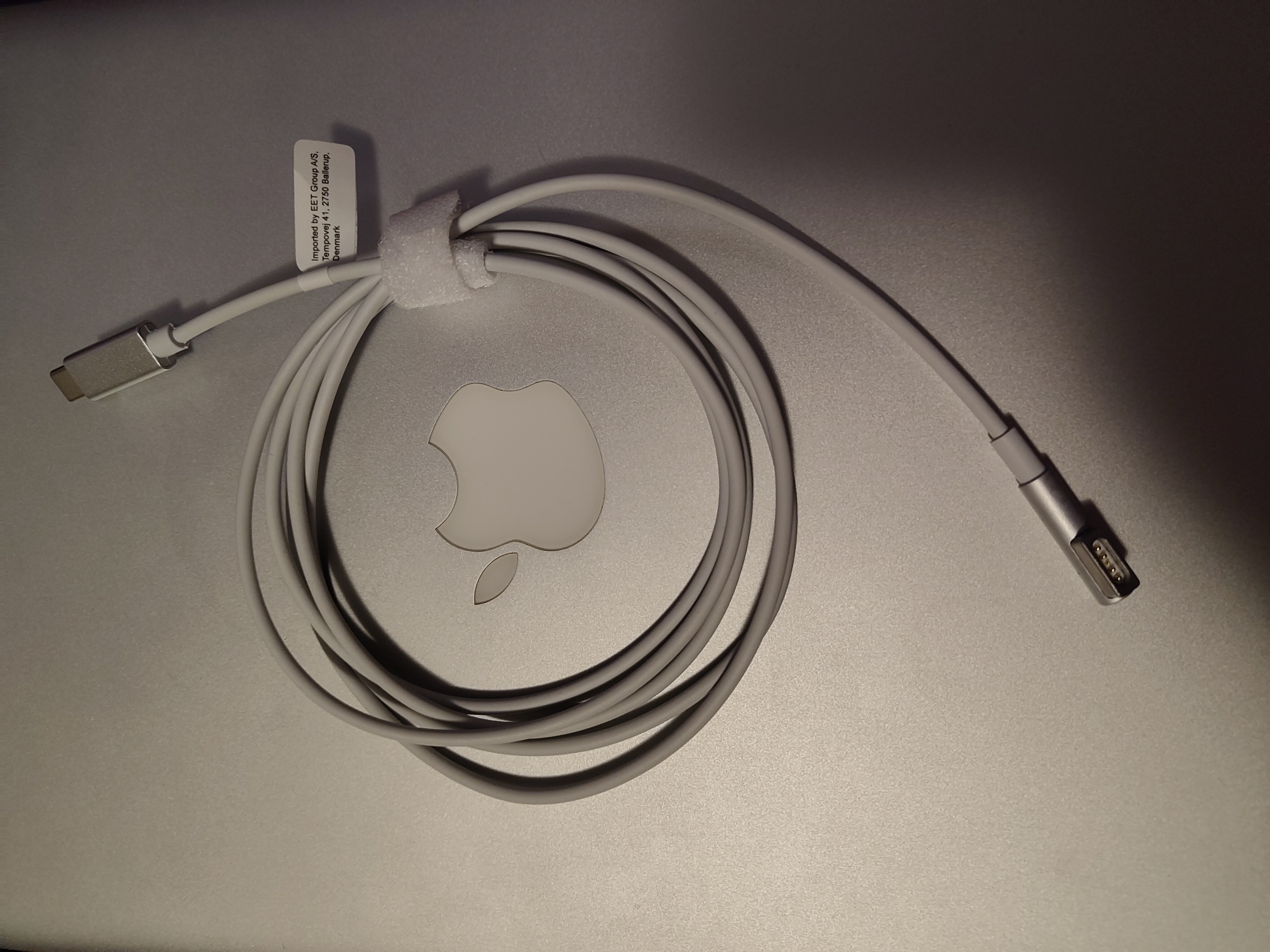
Given that the newer Macbook chargers use USB-C, I was thinking how nice it would be to be able to use any old random USB-C charger to charge this old laptop. Turns out, you can actually buy USB-C to original Magsafe cables. I was pleasantly surprised to find that USB-C-to-Magsafe cables are a thing you can apparently Just™ buy, and they seemingly Just™ Work™. I had to buy a charger-and-cable combo, but one was even available from a local shop, so I Just™ went out and bought one. See: Magsafe 1-lader med USB-C 90 W. I even tested it with my normal 100 W USB-C charger that I use when I travel, and it works just fine. I'm astonished that this is a product you can Just™ buy and that someone is actually manufacturing. I guess there are enough old Macbooks out there and enough people who want new chargers that this is a viable market segment. What's even more incredible is that is apparently works over plain USB-C (assuming your charger can provide enough wattage). There's got to be some smarts in that cable which tells the charger what it needs and pretends to be a real charger when talking to the Mac. Speaking of cable, it isn't great; I'd prefer a braided cable, like the newer Macbook charging cables. I suspect the cable is literally just new-old-stock Magsafe cables that have had the end that would have gone into the power brick reterminated with a USB-C plug. If you can't make Magsafe plug-ends, I guess that's the only possible way to do things, but it ain't great. It does work though, and now I have a much more convenient charger for my old Macbook. Totally worth it. I'm not going to use this cable enough to wear it out, and now I can use any decently powerful USB-C charger I have laying around, and I can even coil up the cable properly and detach it from the power brick. Man, it's such a shame that this used to be uncommon to the point that I'm excited about it being possible, even though it's been more than 10 years since the USB-PD specs came out.
IO is a solid 'eh'. The CD/DVD drive is nice to have, even if I never actually use it. Same goes for the Firewire. The two USB ports are proper USB 3, but there are only two of them. Not that big of a deal nowadays, since I'm not going to use this laptop for things that need a million USB ports, but I did have problems back in the day. They're also really close, so if you have a phat USB stick, and you're using a mouse, you're going to need to unplug that mouse to make space for the USB stick. Forget it if you have two of them. Your internal drive is going to have to stage all that data unless you've jumped on the bandwagon early and dongled up. Very annoying when it happens. Not likely to happen for my use cases today though, thankfully. The SD card slot is a nice touch. The headphone jack works as expected. The Thunderbolt port has only ever been useful to me for plugging in an external display, which requires a dongle. I'd prefer a proper HDMI port, as I have on my new Macbook. Still, the option's at least there.
The screen could be better. The colours and viewing angles are fine, and while the brightness doesn't go as high as it does on my newer Macbook, it's not a problem unless you're outside in more or less direct sunlight. However, the panel is only 1280x800. It's 16:10, which is great, but it's still on level around 720p, not even full HD. In MacOS this is mostly fine, since the way MacOS handles higher resolutions is mostly just by scaling everything up to 200+%, so running on a panel that's actually a lower resolution doesn't feel much more confined than working on a higher resolution does. None of the dialogues or default menus or anything are ever a problem, since they handle lower resolutions just as well as they handle being scaled up for higher resolutions. I also run most of my programs in full-screen, so I mostly don't feel cramped when running Firefox and the like. In Linux Mint however, things can get a bit cramped, since a fair amount of the menus are made with higher resolutions in mind, and Mint doesn't really scale all that well. It runs fine within a decent band of resolutions, but 720p is on the lower end of that, and while it does still run mostly fine, it's a lot more cramped than MacOS is. I suspect if you get one of the people who develops Cinnamon (the DE for Mint to daily drive a Steam Deck (which has an identical screen resolution to my Mac), these kinds of kinks would get ironed out. It's just that very few people Linuxing actually use screens at resolutions lower than 1080p, so these issues don't show up in testing nor in people complaining. The lower resolution of the panel does at least mean there are fewer pixels to push, so the iGPU doesn't have to push even more pixels than it has to. The iGPU isn't going to be happy to run anything intense on a 1080p panel, but then again, I would never do that other than by watching a film on an external display, and it can do that just fine. Just no games or anything of that kind. Stick to the actual laptop screen for that.

The webcam is competent, although nothing special. It's exposed as 1080x720, and while it's perfectly good for what any casual might use it for, it's probably not quite good enough for the standards of today, if only because standards were raised following the events of 2020. In 2019, this would have been perfectly fine. Good even. If you just need to quickly show of something to someone on Discord, it's perfectly fine, and it's also perfectly fine for talking to Grandma over not-Skype (what would Grandma even use for this today that isn't Facetime or Whatsapp?). For your job interview though, standards are high enough nowadays I wouldn't bet on it being fine. If you already have a job though, it ain't a problem.
I like the external battery indicator. I wish they still had that. Same goes for the glowing Apple logo on the back. The machine itself is a bit thicker than my new Macbook, but it doesn't bother me in the slightest. It's only something I think about when I compare them side by side. The hinge it a bit heaver than I remember it being. Maybe it needs to be lubricated or something. It doesn't really bother me though. You can still open it with one hand if you care about that.
Speaking of battery, I figured I should do a battery test, if only to see what potential the machine does have to run untethered. I rarely use my laptops away from a power outlet, so the battery is just there for convenience in my case. Back when I was still using it, towards the end of the old battery's usable lifespan, it probably only had about an hour of usable capacity, but that's enough time for the machine to stay alive when I'm moving it somewhere else, and that's really the only major use case I have for that battery. Well, that and flying and maybe train travel, but I don't do a lot of that, and even less these days. The new battery has already proven its worth to me, since I reinstalled quite a few programs on it while preparing for this review, and did that while running on just battery power. But a rough estimate on it's potential, on what value I really got out of that batter replacement, is nice to know.
I ran two tests, and both were made on both MacOS and on Linux. Both tests start at 100% charging capacity, when the OS reports a full charge and the Magsafe charging cable light is green. Both tests end when the machine shuts down. I used the stopwatch on my phone, since I'm not interested in a very accurate result. I'm just looking for a ballpark number here. The first test was just the machine running full-bore, maxed out. I had the machine running Folding@Home and working on CPU. There's no separate GPU to do work, but the CPU will run at full blast doing this. The second test consists of having various apps open in the background: Discord, Libreoffice, Steam, while viewing a Youtube video in Firefox. I put on a 10 hour fireplace video and just let it run. For the first test I also turned off the display sleep, so that the screen always stays on. During the second test that wasn't needed, since the video will force the display to be on anyway.
On MacOS, the results of the first test were 2 hours and 5 minutes. The results of the second test were 3 hours and 35 minutes. On the first run, the battery went down to 6% after one and a half hours, but then just kept going after that. This might be because the machine downclocked itself to keep itself going, but I didn't check for that. The results tell me that while the replacement battery from iHospital does its job well, it's not doing anything new, modern or magical. It's just a normal battery that's not even any higher capacity than the original it came with was. I suspect a an equivalent modern replacement would be able to get quite a lot more work done, but I'll settle for being able to watch roughly two films, or several hours of note-taking or whatever when doing technical support for someone. It's doing a lot better than a UPS would do, which is essentially what the battery in laptops usually are for me, but having such a big buffer is nice. I can confidently watch a feature-length film on that battery, and maybe even two if that's the only thing I'm doing on it.
On Linux, the results of the first test were 1 hour and 50 minutes, while the second test gave me 2 hours and 15 minutes. I've not done a single thing to optimise the battery usage on the Linux side, and that's showing. If I put the machine in power saving mode and installed some relevant tweaks, I can probably get a lot closer to the MacOS number. I'm not all that interested in actually doing that though, but it's nice to know what kind of a difference I'm looking at here.
MacOS Catalina is the most recent version of MacOS this machine is compatible with, so I updated it to the most recent version and started to install the most recent versions of all the programs I have on my newer Macbook, so everything would as up to date as it could be. Firefox and Thunderbird still support Catalina as well as they ever did, with the most recent version of Firefox being 151.0.4 at time of writing. Some programs don't support Catalina any more. Notably qBittorrent 5 doesn't run on Catalina, so the most recent version I could get to work was 4.6.7. It works as expected, and I don't need much from a torrent client these days, so it doesn't bother me, but it'd be nice to have the more recent bugfixes, especially for a piece of software that goes out on the network. The most recent version of KeepassXC also doesn't support Catalina, so I had to install version 2.7.6. KeepassXC doesn't touch the network though, so I'm less bothered by this. Prism Launcher supported Catalina up to version 9.4. Later versions presumably don't work since they moved to QT 6. See Legacy Operating Systems on the Prism Launcher wiki. I assume the same is the case for qBittorrent for that matter. The version of Discord you can just download of their web page also no longer works on Catalina, but they do have a version which does work and can self-update to the more recent versions: see [Known Issue] Support for macOS 10.15 on Discord's support page. Kind of weird, but at least you can get your way to the most recent version without much issue. Steam nominally isn't supported, and even displays a red warning saying that support for Catalina will end in 0 days (presumably that number is actually -$Several-hundred), and I doubt any new games are going to get support for Catalina, but the old games still work (minus the 32-bit games that lost support going from Big Sur to Catalina).
Even newer programs (relatively speaking) like Stats and Hot still support Catalina like 2019 was just yesterday. But obviously, not all programs do. Mullvad's VPN client doesn't. The last supported version I got working was , and while that does work, it complains about it being a vulnerable version. To be fair, it would be possible to set up a Wireguard network on my router, and VPN through that, but I'm not about that life quite yet. In the same vein, Wireshark isn't compatible any more. The latest old stable release, 4.4.14, is incompatible. They also don't have an old releases page from which to download an older version, so I didn't bother to hunt down one that works, especially since I barely ever use it. Freetube was also incompatible, which is especially annoying, since even if you do find an old compatible version, it won't work any more, since YouTube keeps being fucking cunts about most things. Kiwix thankfully doesn't have that issue, but I had to go back to version 2.1.2 to get that going, a version from .
Once you're past the problem of actually getting programs which are compatible though, things are pretty all right. Firefox has gotten a bit heaver with time, but it's not a problem for the pages I browse, but it does take a bit longer to launch and load pages than I would expect. Same goes for Discord, which makes sense, being an Electron app. Thunderbird works like a dream, as it always has. Libreoffice works as well as it normally does. Same goes for all the smaller utilities here and there, like Keepass, TextEdit, Sublime, Kiwix, Qbittorrent, Audacity, Calibre, Inkscape, and probably more that I've forgotten. The only place where I noticed a problem was with Handbrake, which is no real surprise. Unless you need to compress a 10 second clip, it's not worth it to even consider rendering anything on this machine, especially if you intend to render to H.265 or AV1. There's just too much maths involved, so it takes forever. It can do it in a pinch, but it's better left to a proper desktop or a more modern laptop. I guess if you're happy with H.264, you could use hardware acceleration from the iGPU to render without taking ages. Handbrake even supports it video the VideoToolBox encoder. And if you're doing rendering on a machine like this, you probably don't care that much about quality, so that might be a worthwhile trade-off.
My machine is after all hardware accelerated, but the only vaguely modern codec that is accelerated is H.264: see Intel Graphics Technology#Capabilities (GPU video acceleration) on Wikipedia. The only other video codec I run into that’s accelerated is MPEG-2, and that’s not something I run into from other people any more. Only ancient videos still use that, and I guess if you’re still watching DVDs, in which case, more power to you. My guess is that DVDs are actually the reason why this acceleration is still here (I get it in 2005, but 2012 is well past the golden age of the DVD), but maybe MPEG-2 (and MPEG-4?) web video was more common than I though it was. Or maybe implementing it was basically free. Either way, I'm not complaining, but I'm probably not going to see any use from it either.
This means that H.265 and AV1, the newer, better and more efficient codecs used today, will have to be decoded on CPU. Thankfully, VLC supports everything under the sun and does it well, so I was able to test just how bad it is. Viewing an H.265 encoded 1080p video would run the CPU at around 30%, while viewing an equivalent AV1 encoded video would run it a 50-ish%. I got similar figures viewing videos through Firefox. This isn’t all that great, as it will reduce battery life, but assuming you don’t care too much about that, I think this is mostly acceptable. The CPU usage is far from high enough to bog down the machine, and if you’re watching video, you’re probably singularly focused on that. And if you actually are doing something else on the side, that other thing is probably not something very heavy. And even if you are running a render at the same time as you’re watching a video, MacOS seems to have the common sense to prioritise viewing the video without frame drops, while the render will just take a bit longer.
Speaking of which, I tested basic multitasking to see if it still holds up. All the relevant programs I use haven’t really changed, but it’s been 10+ years since I first started using the machine, and it’s been over 5 years since I still used it regularly, so some bloat has certainly been building up over the years, which might make things heavier for it. Thankfully, it’s not too bad. Browsing the web in Firefox, with Discord and Steam open in the background, while a video is playing background music, while typing up this section of this article, everything still worked wonderfully. It took Steam, Discord and LibreOffice a bit longer to launch than I’m used to, but it was still far from getting ridiculous. If the SSD in my main PC wasn't top-of-the-range, I might not even have noticed the difference. It ran perfectly fine, as expected. To be fair, I’m running Firefox with uBlock Origin, as anyone with more than three braincells should, and I’m not browsing particularly heavy sites, but for what I normally do on a laptop, this is perfectly fine. Even while playing a full-screen game like Civilization V, while things clearly get more sluggish, it’s still possible to navigate without issues. Having a wiki open on the side and at the ready, as well as some notes you’re making while playing, is not an issue at all.
After dongling up, using a second monitor works great too. You'll only have access to one external monitor, and only up to 2560x1600, but that's plenty enough in my opinion for this machine. I'm only really expecting to use this at 1080p to hook up to a TV to watch a film, and for that, this works great. Heck, if you leave the Macbook out of sight, and just use it with an external wireless keyboard or something, nobody would even notice that it's a 14 year old machine, at least not unless they're a mac connoisseur who can easily spot the minute differences between MacOS versions. For casual use, this works great. MacOS defaulted to mirroring the displays, but extending them worked just fine too. You'll be pushing more pixels, but it doesn't really matter for what you'll be using an external monitor for. The most demanding task within reason you'll be pushing is a film running at 1080p. Everything else will just be casual multitasking and the like, which doesn't stress the iGPU at all. Just don't try your luck with games, since they'll run even worse on an external display, given that external display is very likely to be a higher resolution than the built-in screen.
It's a a shame Catalina removed support for 32-bit apps. I don't have any normal software I care about that still uses it, although I do remember having to update a few apps that I just had never updated back when Catalina first dropped. When it comes to games however, it's a very different story. The loss of 32-bit support made a very significant chunk of my Steam library unavailable on MacOS. All Valve titles are now unplayable on MacOS, and the same goes for any other older-ish games, that were probably 32-bit on Windows too. Those are, unfortunately, the ones that would run well, or at least decently, on an older machine like mine, so the viable MacOS library for my Macbook is really small as a result. Some games did receive updates, while some other are new enough that they were 64-bit to begin with, but seeing the list of titles that should be playable, but just aren't, is really depressing. No Half-Life 2, no Call of Duty 4, no Portal, no Lego Star Wars: The Complete Saga and many others.
I've considered downgrading to Mojave, the previous version, since Catalina doesn't add anything I care about, while Mojave still allows me to play 32-bit games. I'm not sure I'll lose out on any software support doing that. It doesn't seem like it from what I've gleamed from looking for older software versions for some of my other programs, but I can't really know unless I try, and don't really feel like going on that adventure, since, although I've lost a significant amount of games to play, A.) I don't really intend to play many games on this machine any more. I just want the nominal ability to do it if needed, and B.) If I really want to, I can boot into Linux instead and play the game there instead.
I played most of these games with a mouse, since playing most games with a touchpad just isn't a great experience. Any realtime game pretty much requires a mouse unless it's fine with keyboard controls alone. I mostly played these games and others with a mouse back in the day anyway, so this is the intended experience as far as I care. I do have a better mouse nowadays than I had back then, but when the goal is to just kill time, unless you've got a truly awful mouse, it mostly doesn't matter what you have.
Civilization V can still be installed with the unsupported version of Steam that I can still get for MacOS Catalina, so I might as well try that. I played this game for the first time on this very machine, so it’ll be interesting to see how it runs. The old launcher is still around on the MacOS version of the game. Can’t say I miss it, but whatever. The game also requested the input monitoring permission, which I first opted to not provide to the game. That however caused it to crash on launch, so not giving the game that permission is apparently not a real option.
Once I was in the game I checked the options menu just to make sure the settings weren’t set to something insane. The game opted to run at the native resolution of the panel, 1280x800, at mostly low settings, which seemed fine. I loaded up a game, and it took longer than I am used to nowadays, but about as long as I remember it taking back in the day. On a modern machine it’s basically instant, but not here. In-game, the FPS counter was hovering around 40-50 FPS, which seems accurate to my experience from back in the day. The UI is a bit more cramped due to the lower resolution, but it’s nothing major. It's still very playable.
Since Civ is turn-based, the FPS being low-ish isn’t a problem. You won’t be setting any speedrun records, even if the time to process turns wasn't so drawn out due to the CPU not having as much oomph, but you should be taking your time with Civ V anyway, so it all works out in the end. It will run steadily worse towards the end-game, but even then, you have a fair amount of wiggle room. Take it easy, be casual. You can even play the game reasonably with just the touchpad, since it’s all turn-based and you don’t need split-second accuracy. It’s great. Definitely still a good time waster.
I got into Europa Universalis IV on this very machine. This is the machine that got me into grand strategy games. I think I had over 2000 hours by the time I started playing it on a more proper machine, and even then, I continued to play it on this machine when traveling. So I know this game should run fine here, since I've played it quite a lot.
The newest version of Europa Universalis IV was 1.37.5 when I tested it, but that one never seems to actually load for me on Catalina. Steam will download that one though, since the game itself is still listed as compatible. Can't really blame them though, since Steam obviously doesn't support Catalina any more. Thankfully, Paradox is nice about these things and let you revert to older versions of the game whenever you want. Version 1.36.2 seems to work fine for me. It just takes a bit of time to load. It runs at a solid 10-15 FPS, which is less than it did back in the day. Presumably all the patches over the years have added some bloat. I guess some mods can reclaim some of that FPS. It's still vaguely playable, but it makes for a much slower game than I'm used to, although probably not much slower than how I played it back then. Overall though, I'd still play this in a pinch. It's just a shame the newest version seems to crash, but at least I didn't have to back several years to find some patch that did work. Heck, this could just be a missed QA target and that they forgot to test Catalina on the most recent patch. To be fair though, the minimum requirements on Steam does mention Catalina as the minimum OS requirement for MacOS: See Europa Universalis IV on Steam.
Minecraft's been around for a long time, but it too has gotten more an more bloated over the years. Still, I remember playing it on this machine well past the time I started noticing that, so I assumed it would still be a good experience, and I wasn't really disappointed. I decided to use Prism Launcher, although the most recent version doesn't support Catalina any more. But version 9.4 still does, and still works without issue. The newest version of Minecraft at time of testing, 26.1.1, downloaded and installed without issues. I didn't install any mods, as I wanted to see how the default vanilla experience would be, but some performance mods like Sodium and Lithium would probably be a good idea; it's pretty much always a good idea. There were some hitches when loading the world, but after that, as well as after turning off VSync and checking the render distance (16 chunks), it mostly kept steady at 25-35 FPS. Sometimes higher, sometimes lower, rarely a big problem. It's about as playable as I can remember it being, although that was on more developed worlds, while here I was walking around a newly created world, so performance might drop over time as you play and place 16 quadrillion chests. But it's mostly fine.
Honestly, I can easily imagine pulling this machine out on a Minecraft LAN party. If I need 5 machines to play Minecraft on, I'll give the 4 people before me in line the seats on my main PC, my NAS, my newer Macbook, the random laptop I have from a friend, and then I'll play on this old Macbook. It's still a fine experience, but it's the worst of all of those, but I'll still be able to have fun on this machine. I'd just want to keep an eye out on the other machines, just so they aren't dicking around where they shouldn't.
osu!lazer ran like a dream, at a more or less consistent 60 FPS while actually playing. I didn't bother testing regular osu!, since while I think it is playable on macOS, it was never a polished experience, while osu!lazer very much is. The menus could stutter a bit, and the same thing could happen during pauses in songs, but so long as I was actually playing, I had no issue. Goes to show the optimisations done with osu!lazer. osu! was already probably one of the most optimised games out there, but since it didn't have a native MacOS version before, that didn't really matter as far as this machine is concerned. Now on the other hand, it can be played as it should be, and as it should have been back in the day. I didn't test any extreme songs, and I mostly just play on songs around 2-4 stars, so maybe the performance drops on more difficult songs, but it's not like the machine has zero breathing room here. If it's running as steady like a rock on my usual songs, I have faith in its capacity to handle heavier songs. Just remember to disable mouse acceleration. The game's basically unplayable if you don't do that, so do that. That's what Linearmouse is for.
Katawa Shoujo is available on MacOS, and given it's a visual novel, it isn't exactly hard to run. I actually played this game for the first time on this machine. I even have the save file from back then, for whatever it's worth. It's not a game I'm likely to actually play, since I've already played it and know where the story goes. My heart's already been torn by Hanako's joy and/or anger, depending on what ending you get. But it's nice to have the option of opening it, if only to get to hear Wiosna again.
Battle.net seems to still work. It's still riding on its old support. Blizzard hasn't even updated it to natively support Apple Silicon. Hearthstone requires Mojave or newer, so that's still on the table, although it doesn't run all that well if you're constantly playing with fancy new cards. I'd imagine support will disappear soon enough if they actually update the client much. It's functional though, at least for now. World of Warcraft should still work too, given how Blizzard wants every person with a pulse to be able to pay them for the privilege to play it, although I didn't confirm beyond checking that I could install it.
Plenty of emulators still work, but not all of them. Newer versions of Dolphin require Big Sur or newer. You could still get an older version though. Same goes for PCSX2. Those emulators would probably also be better served with a true 4 core chip. RetroArch still works and probably will until the heat death of the universe. From there the world is mostly your oyster, so long as you don't try to push things.
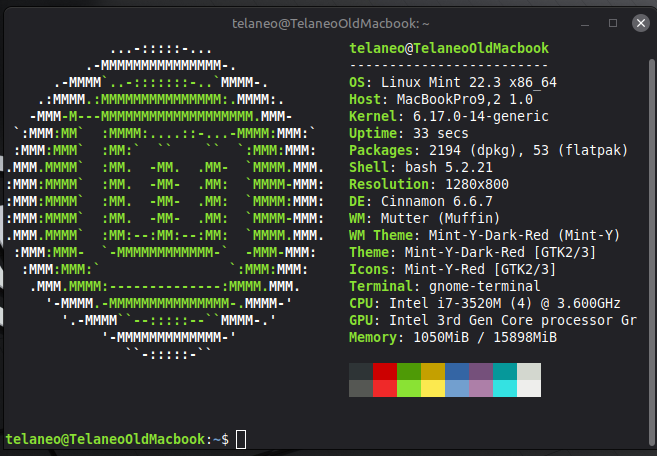
Mint installed without major issues. I had to install the proprietary Broadcom driver to get wifi going, but that was included on the Mint ISO, and once installed, wifi worked as expected. After that it was mostly just the normal hassle of setting up a new machine the way I like it.
Installing software was no issue, unlike on MacOS. My machine is 64-bit and has at least basic hardware acceleration, so Linux support isn't a problem and basically everything is installable and runnable. Some things may not run great, but they do run, and all the usual things I need aren't terribly heavy anyway. And if things do become too heavy for it, I can scale back as needed. Oh, the joys of Linux being able to run on basically anything. None of the normal programs I run proved to be any heaver than in MacOS, or really, different at all. I already skew towards open-source software, and did so before I went to Linux on my desktop, so I just end up using the same software on Linux as I do on MacOS or Windows. Firefox, Thunderbird, Libreoffice, Discord, and all the other normal suspects work just as well as expected. Same goes for all the normal smaller utilities.
Video playback proved to be accelerated, just like in MacOS, with the same limitations: only H.264 and MPEG-4. Processor usage was roughly on par with MacOS as far as more modern codecs were concerned, like H.265 and AV1. VLC continues to be a great piece of software.
One annoyance is CMD vs CTRL as modifier keys. On the keyboard on this machine, I instinctively reach for CMD when I want to copy or paste something, since that's the Mac default. I believe that the Bootcamp drivers and utilities for Windows also have an option to swap those precisely because of this. Ideally I'd be able to swap them myself, but apparently, that's easier said than done. I've been down that path before, in an attempt to make a custom keyboard layout for my desktop PC. In that case I wanted to add a few more characters via the right Alt key, and replace some of the defaults, but I never really got anywhere on that front, and there's no simple app or whatever that you can make a custom layout with and then just add as your own. It's not impossible to do, but it's really getting in there. The annoying thing is that Windows kind of has this with the Keyboard Manager utility from PowerToys. That's not perfect either, but it does work if all you need is to replace a few keys. But alas, nothing that simple seems to exist for Linux, or if it does, it's really well hidden. I can manage, but it's annoying to have to fight against your muscle memory, when in theory you could simply change the machine to accommodate you. I'll be very happy the day a keyboard design tool shows up on Flathub along with a list of documentation of how to import that into your favourite Linux distro. Heck, I'll even take some one-liner terminal command to add the final keyboard layout, but please just let me design the layout itself in a GUI.
The touchpad is a pain point in Linux. The hardware is obviously capable, given how good it is in MacOS. It's not quite as good in some ways. The sensitivity's a bit of, but that's adjustable. The big problem is that smooth scrolling isn't a thing, at least out of the box. This makes scrolling just a horrible experience, and one I thus tend to avoid. Arrow keys to the rescue I guess. It's probably fixable with some config, but it should really work out of the box. This default is actually insane, in a world of otherwise sane defaults, given most of my other experiences with Mint.
Touchpad gestures were disabled by default, which sure is an default, but I'm not sure if it's a sane one. It's not like MacOS shows you how the gestures when you first try to use MacOS, and Mint (I guess Cinnamon in this case) is less confident in them than MacOS is, so it might not be unreasonable to have them be disabled and leave it to the user to enable them and set them up the way they want them. It's not like the menu's very hard to find. It's right there in the normal system settings menu.
Once they're enabled though, they work pretty great. Not as great as on MacOS, but that just might be the tighter integration with the touchpad than anything else; a problem in the same vein as the touchpad scrolling being horrible. Using multiple workspaces works out pretty good. Again, the integration isn't quite as good. I'd love to be able to just fullscreen apps and have them create a new workspace, but alas, it doesn't work that way. Maybe there's a key combo or a mouse-plus-key combo that does that? Left-click maximize+ALT or something? If if it's already a thing though, I haven't found it. Switching to a workspace, opening a program and fullscreening it there does work, but it's more fiddly. It's a better experience than Windows though, so that's certainly something. I also had to remap the keyboard to be able to see the overview of all workspaces (Mission Control in MacOS). In MacOS, that key is F3, so I mapped it thus. The default was CTRL+ALT+UP, which I would never have discovered naturally without going through the list of keyboard shortcuts. Once you're up and running though, multitasking on this machine becomes pretty great. It's still kind of wild to me to have multiple full-screen programs open on a laptop and have it work out as great as it does. My brain's computer workflow somewhat ossified in the Windows era where you only had one desktop to work with, so using many programs just turned into a mess no matter what you did (and it still does for many people, even if they do have access to multiple monitors or virtual desktops). But nowadays, being able to organise your desktop software is just a standard feature apparently. It's wild, man. I guess the next thing I should try is a tiling window manager, but that'll be an adventure for another time.
Using an external monitor proved to work just as well as it did in MacOS Catalina. Not really a surprise, given that Intel iGPUs are well supported, and other than the only output being a Mini Displayport, none of the hardware is really weird or obscure enough for this sort of thing to become a problem. Linux can't make magic happen though, so you're still limited by the power of that iGPU, but it'll do what you need just as well as in MacOS. Just don't try your luck with a game on it and you'll be fine.
The games situation on Linux is a lot nicer than it is on MacOS, at least when it comes to selection, especially since 32-bit apps got killed off on MacOS and thus most of the older games became unavailable to play through Steam. That said, things weren't a cake walk. I'm still running on a more than decade old integrated graphics chip here, and Linux can't do magic, even though it may seem like it at times. The performance is going to be what it's going to be. Another downside of being stuck with an integrated graphics chip as old as this, is the fact that it doesn't do Vulkan. This means that, unless you fiddle a bit, all Steam games will fail to even launch. Proton's default settings assume your GPU supports Vulkan, which is a valid assumption for any graphics chip you're likely to have, but not for a chip as old as mine. It also doesn't have any conditionals to check for Vulkan support, so it just falls flat on its face and doesn't launch anything.
There is a solution to this though: add PROTON_USE_WINED3D=1 %command% to the game's launch options. This will tell Proton to use Wine's Direct3D emulation, which uses OpenGL. OpenGL will work on anything, but it will be less efficient, which is especially not great, given that it will cut into your already low performance. It does however get you into a running game. Whether or not you actually want to play that game on the hardware which will need that launch option is another matter, but it at least gives you a fighting chance of playing the game in question. You're not going to be playing Cyberpunk 2077, but Half-Life 2 will run and even be playable, at least in theory.
I had some trouble with games having audio crackling under high CPU load. Given that games tend to pretty heavy on this CPU, that wasn't really acceptable. Fortunately, I found a solution on this forum post: [GUIDE] Crackling sound on high CPU usage with pipewire+easy effects. All I needed to do was to uncomment and edit in default.clock.min-quantum = 1024. The file wasn't located in the same place as in the forum post though. In my case pipewire.conf was in /usr/share/pipewire. But editing that file did fix the problem.
In real-time games I had issues with rubber-banding, as if the game renders fine for a second, then has to catch a break for half a second. The FPS counter seemed high and stable enough, but I might just be running into issues on account of not having much performance on tap and using the fallback rendering which isn't really supposed to be performant anyway. It's not always an issue, especially outside of action games, but it is annoying.
Civilization V did run, but notably worse than on MacOS, closer to 20-30 FPS than 40-50. And that was just during the start of a game. The late-game would probably not prove to be an enjoyable experience. I assume the translation layers are not doing the game any favours, while the MacOS version is probably native (or as much as it can be or one could reasonably expect). It's still playable, but I'd boot into MacOS if this was the game I wanted to play.
The newest version of Europa Universalis IV, version 1.37.5, ran without issues on Linux, other than the problem that I had to enable Direct3D emulation. It ran even better than on MacOS, at around 20-25 FPS, which is more inline with what I remember it running at back in the day. At this level, playing it isn't really a problem at all. The higher speeds don't work all that well, which is a bit annoying for me, who's used to just speeding by at this point, but I guess this is one way to get better at microing. If my intent is to play this game on this machine, booting into Linux is clearly the way to go.
Minecraft ran surprisingly bad on Linux. Same settings as on MacOS, that is, defaults beyond checking the render distance (16 chunks) and disabling VSync. It ran at 10-15 FPS with notable stuttering. I would not play the game like that unless I was truly desperate. It could probably be improved by installing Sodium and some other performance mods, but I doubt it would rise above what you could get on MacOS by doing the same there. At best you'd get up to the same level my making the same use of the hardware. So unless you need a newer version of Prism Launcher than you can install on Catalina, there's little reason to be on Linux for Minecraft. I'd rather boot up in MacOS for this one.
osu! ran differently on Linux. You'll need to enable VSync for it to be playable. If you do that, you'll get a fairly stable 60 FPS and a comparable experience to MacOS. If you uncap the framerate, it'll run at 120+ FPS, which is a lot higher than I got on MacOS, but the thermal throttling will kick in every now and then and cause massive stutters, which make the game unplayable. The amount of times I've needed to enable VSync to make a game playable pretty darn few. I can probably count it on one hand, so this was unexpected. Goes to show that Linux can make excellent use of the chip in question. It's just that the thermal solution can't keep up.
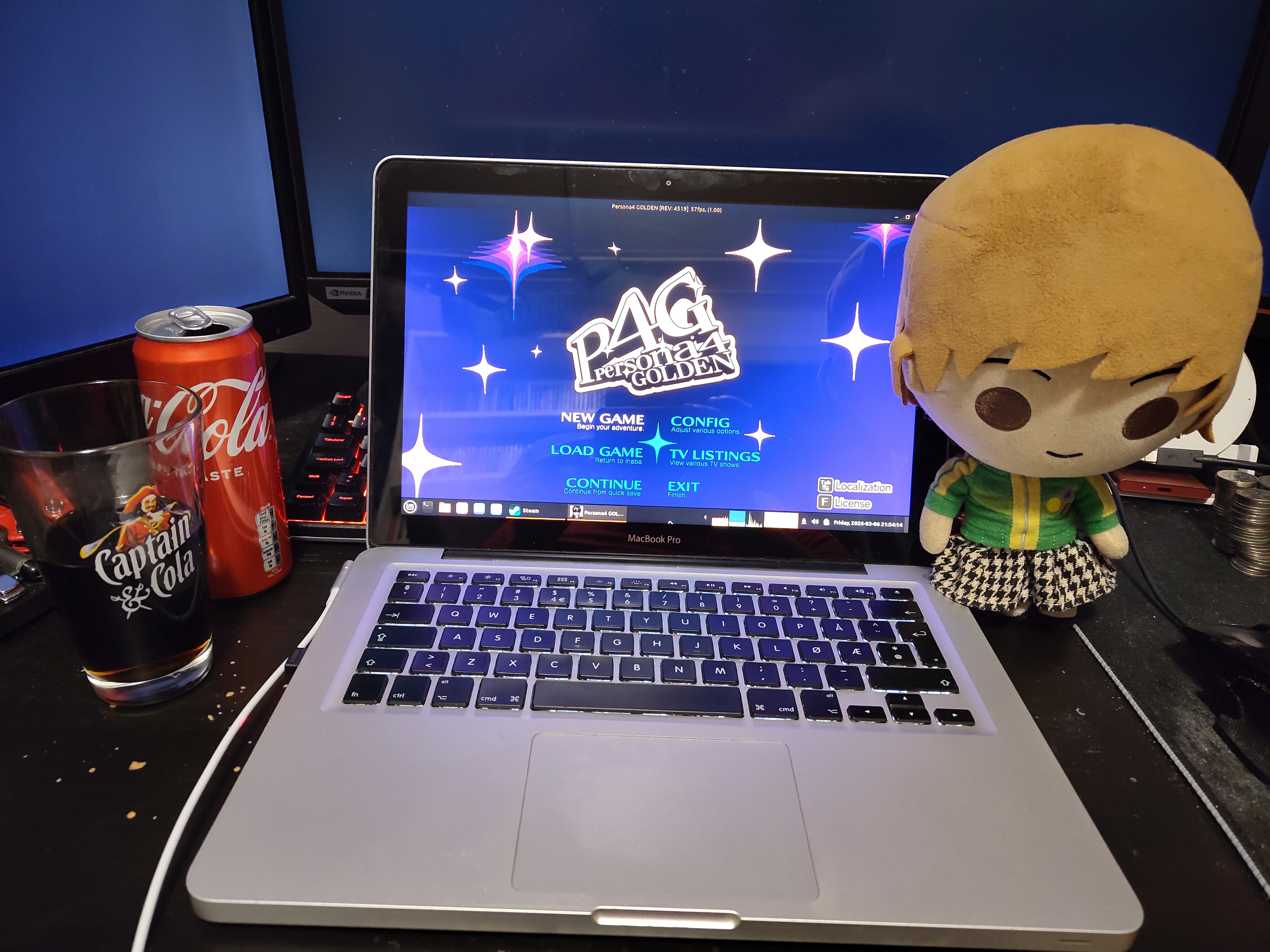
The idea that I can play a recent-ish game on my laptop from 2012 and still have it run well and be able to enjoy it fills me with joy. To be fair, Persona 4 Golden is a PC port of a PlayStation Vita port of what was originally a PS2 game, so it's not a big ask to have it run, but I guess that goes to show Atlus' ability to not fuck up, since the system requirements reflect that.
The game launched fine, and was running at around 30-40 FPS during combat and dungeons. I was only playing through the starting dungeon up through saving Yukiko, so maybe the later dungeons are heavier, but I doubt it. Even if true, it's not to a degree that would make the game unplayable. The FPS is lower in the overworld when just walking around, but it's not a pressing issue. The rubber-banding issue is present, but not to a degree where it bothers me. It makes it slightly harder to time your attacks against shadows in dungeons, which might bother someone new to the game, but not me.
Another nice bonus is that I can play this game without a mouse, as it was playable without joysticks on console. That means that it's a good choice if I happen to not bring a mouse wherever I'm going.
Overall, it's a solid experience. If I were stuck on some boat or hotel without internet, I'd certainly have many hours of entertainment by playing through this game. It's just a shame the old Chie voice actor isn't in the Golden version, but I guess I could install a mod to fix that (Love you Chie <3).
The joy of playing Skyrim is something I hope I will never lose. I don't think I have ever not enjoyed playing Skyrim. When Todd Howard re-releases Skyrim for some toaster, I'm his target audience. I don't even care that much that it runs like shit. Skyrim is enjoyable no matter what (at least if it runs at 10+ FPS without other issues).
Skyrim isn't readily playable on MacOS. It was never possible to play through Steam, but I did play it through Wine way back in the day through some wrapper someone had made just for that purpose. I'm not about to relive that adventure, when I can play it on Linux instead, where I should have a perfectly cromulent experience.
Since I'm running on integrated graphics, I'm not going to invite trouble by trying to run the Special Edition or anything newer. I have the original release of Skyrim, and that's what I played on this machine way back, and I'd like to keep at least some semblance of performance. The default settings when launching the game defaulted to all low settings, and I set the resolution to the lower of the two available options: 960x600. I could download some mods to maybe get some better performance, and some quality-of-life improvements for that matter, since I'm very used to play Skyrim that way nowadays, but I think trying out the default experience first is the wise thing to do.
I turned on Steam's FPS counter to get a reasonable look at how well it performs. I keep that thing on all the time anyway. I first loaded an old save I apparently had just to see if it loaded, and it did. But I imagine I'd get a better understanding by playing from the start of the game and having a look around after getting through starting area. So I played through Helgen and went on a trip to Solitude, via the Hall of the Vigilant.
First of, the game isn't all that pretty to look at at low settings. It looks worse than the original console releases, something I'd know, given I played the PS3 version first back when the game first game out. That mostly doesn't bother me though. Skyrim is still Skyrim, even though it doesn't look as nice. The FPS is mostly around 20-30 after the CPU settles in at non-turbo speeds.
There are however two major issues: The rubber-banding effect happening is very apparent in a first-person game like this. It feels like I'm walking three metres at a time, with a half-second pause every third metre. It seems to go away when the game manages to run at 50-60 FPS, but it can't do that consistently, so it's more or less a constant presence. This alone makes the game not really playable. Just walking around doesn't feel right. It's still kind of doable as a stealth archer, since you're always far away from enemies and mostly just one- or two-shot them, but it's not really a pleasant experience. It almost feels like a physics-being-tied-to-FPS problem or something, but I didn't think this applied to the PC version, given that an equivalent FPS on console obviously runs fine. Maybe there's a setting or something that can be tweaked to fix this. The second problem is that casting spells just kills any FPS you have. Using the starting spell Flames to kill two enemies in Helgen dropped the framerate down to 2 FPS. That's unplayable no matter what. Not sure what the cause is here.
All in all, it runs worse than it once did on MacOS using Wine, and worse than on consoles, with problems that make it practically unplayable. If it ran at a consistent 20 FPS, or even 15 for that matter, it would have been fine, but the rubber-banding issue makes it a thoroughly unenjoyable experience. If I were stuck on a desert island with no other way to play Skyrim, I probably still would, but given any other reasonable option, I'd pick that instead. Maybe these issues are fixable. I'd actually imagine they are, but it's a shame the out-of-box experience, even after some tweaks to get the game running in the first place, it still doesn't really hold up.
Call of Duty 4: Modern Warfare suffered from the same problems as Skyrim did, despite being an even older game. Maybe if I turn down the graphics settings enough it'll be kind of playable, but it's not worth playing at 640x480.
Cookie Clicker loaded my endgame save just fine, although it was clearly chugging a little bit. Not that it really matters in a game like this.
Katawa Shoujo ran fine, with the added bonus that I get to play it through Steam. It's even the Linux version, so I didn't have to fiddle with Wine. You can download it from their website, but there's little point when you've already got Steam up and running.
Half-Life 2 seemed to run mostly fine. It ran at 50-ish FPS for me most of the time, although it could dip a bit here and there, whereupon the hitching issue started to become more apparent. Maybe it's more of a problem in the later levels, but I didn't have a problem in the air boat levels. I did play the version called Half-Life 2: Update, which is slightly heavier than vanilla, but I doubt it would have made a difference. Bonus points for having a Linux version, so no dicking about with Wine here either.
Portal 2 on the other hand runs at, like, 15 FPS. It has it's moments where it runs at, like, 50, which would be totally fine. But as it is, I wouldn't recommend playing it like this. I remember it being better when it was playable on MacOS back in the day, so something's not quite right. Which is confirmed by trying to run it though Proton. That gives me a consistent 30+ FPS, but then the hitching problem comes back again with a vengeance. It's more playable than running the Linux native version, but I still wouldn't recommend it.
The original Portal on the other hand, runs like a dream. Pretty consistently at 60 FPS, rarely under 50.
Retroarch, as always, makes the world your oyster. The emulators don't seem to run drastically different than on MacOS, so the same limits apply, but the game selection is still enormous.
It's pretty usable, as long as you know your limits. Stick to games that aren't too heavy. Pray that the websites you visit aren't too ridiculous, but they usually aren't (they could be better though). Multitasking is still fine. Catalina is still mostly fine, but its age is showing. Linux is very viable if that becomes an issue and you need up to date software. The Plataeu, as Cathode Ray Dude called it, see 7 Users on 1 PC! - but is it legal?, is clearly visible here, since many of the tasks I do on this machine haven't changed. It's just a matter of software support, if nothing else. If the battery hadn't been an issue a few years back, I would probably still be using this machine as my daily driver, since I don't need my laptop to be a beast at everything. It's mostly just for reading and browsing, and some video here and there, and there's nothing along those lines that ever really becomes a problem. I can even play some games on it, and with that, I'm pretty happy with it. Could be better, could be a whole lot worse, but all in all, I'm pretty satisfied with my experience. I'll be sure to keep it around as a backup machine, if nothing else.
Send feedback, messages, complaints, questions, musings, poems and cat photos to web@telaneo.net.